Instagram photo downloader
One click is all it takes! (Desktop use)
Installation
-
Copy the code below.
- Show the bookmarks bar if it is hidden.
- Chrome / Edge:
Ctrl + Shift + B
- Chrome / Edge:
-
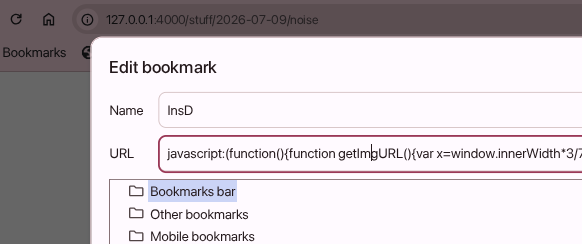
Right-click the bookmarks bar and select Add page…
- Fill in:
- Name: InsD or whatever you want
- URL: Paste the bookmarklet code.
- Save the bookmark.
Usage
- Open an Instagram post or story, or simply leave the desired photo visible on your screen while domscrolling your feed.
- Click the InsD bookmark.
- The original (hopefully) media will open in a new tab.
- Save the file normally from your browser.
Notes: Instagram Stories containing music, special effects, or certain interactive elements does not work. This bookmarklet only works with media currently visible on the screen. Instagram may change its website at any time, which could break this bookmarklet. But it’s been working since 2021 so yeah =))
Code
javascript:(function(){
function getImgURL(){
const img=document.elementsFromPoint(innerWidth*3/7,innerHeight/2);
return img[1].src;
}
function getStoryURL(){
const img=document.elementsFromPoint(innerWidth/2,innerHeight/2)
.find(e=>e.tagName==="IMG"&&e.naturalWidth>400);
return img.src;
}
window.open(
location.href.includes("stories")
?getStoryURL()
:getImgURL(),
"_blank"
);
})();